Why Modulo?
In an era where production outages can cost companies billions in lost trading volume and developer time, the distinction between simply "monitoring" and actually "resolving" has never been more critical. Modulo represents a paradigm shift, moving beyond the passive observation of incumbent tools and the limited scope of standard coding agents.
Here is why your team should choose Modulo to reclaim their time and peace of mind:
Modulo > Coding Agents for Bugs
While general-purpose coding agents like Claude, Gemini, and Cursor excel at code generation and refactoring, they fall short when it comes to debugging complex production issues. Modulo is purpose-built for bug resolution with capabilities that go far beyond what standard coding agents can offer.
Deep Contextual Intelligence vs. Basic Coding Agents
Standard coding agents often lack the environmental context needed to solve complex production issues. They see the code, but they don't see the "live" application.
- Stack-Wide Understanding: Modulo ingests massive contextual information from your entire application stack, allowing it to understand complex relationships across various services.
- Trace-to-Code Integration: It represents a new category of software that integrates directly with code repositories and application traces to generate fixes autonomously.
- Error Context Analysis: Unlike general agents that need you to copy-paste stack traces, Modulo automatically pulls error messages, logs, and execution traces to understand the full failure context.
- Multi-File Bug Analysis: Standard agents struggle with bugs that span multiple files or services. Modulo's knowledge graph understands dependencies and cascading effects across your entire codebase.
Safe Experimentation via Hypothesis Testing
One of the greatest fears during an incident is that a "fix" might make things worse. Coding agents provide suggestions without validation, leaving you to manually test and verify.
- Isolated Environments: Modulo creates isolated environments on-the-fly for hypothesis testing, something standard coding agents cannot do.
- Automated Validation: It automatically generates and validates multiple fix hypotheses, selecting the optimal solution based on comprehensive testing before anything touches your production system.
- Bug Reproduction: Modulo reproduces reported issues in controlled environments to ensure the fix is valid against production-like scenarios—not just syntactically correct code.
- Regression Testing: Every fix comes with automated test cases that verify the bug is resolved and no new issues are introduced.
Measurable ROI for Modern Engineering
The cost of maintenance is a silent killer of innovation, with developers spending an average of 17.3 hours per week on debugging and resolution tasks.
- Immediate Impact: Early users report cutting incident response time for certain bugs to zero—a level of automation impossible with manual coding agent workflows.
- Accelerated Onboarding: Beyond fixing bugs, Modulo's seamless setup allows new contributors to start working on a codebase in an organized and guided manner.
- Continuous Learning: Unlike stateless coding agents that start fresh each time, Modulo learns from your codebase patterns and past fixes to improve over time.
How Modulo Integrates with and Improves APM Tools
Traditional Application Performance Monitoring tools like Datadog, New Relic, and Splunk are excellent at detecting and alerting you to problems. But they leave the hardest part—actually fixing the issue—entirely in your hands. Modulo bridges this critical gap by integrating directly with your existing monitoring infrastructure.
Closing the "Resolution Gap"
Traditional APM tools are designed to alert you when something is wrong, but they stop at the most critical moment: the fix. This leaves engineering teams to manually sift through logs and traces during high-pressure outages.
- The Modulo Difference: It is an intelligent APM that not only detects issues but resolves application breakages in real-time.
- Actionable Outcomes: Instead of just an alert, Modulo provides automatically root-caused bugs and actionable fixes, effectively serving as your central hub for incident response.
- Trace-to-Fix Pipeline: Modulo consumes distributed traces from your APM (OpenTelemetry, Jaeger, etc.) and automatically maps them to specific code locations that need modification.
- Alert Enrichment: Transform vague APM alerts into concrete fix proposals with confidence scores and implementation details.
Eliminating Alert Fatigue and Tool Sprawl
Legacy APM solutions are often architected for a pre-AI era, resulting in "tool sprawl" and a flood of false positives that mask real issues.
- Reduced Noise: Modern APM tools generate false positives, which masks real issues. Modulo uses a continuous learning system to improve detection accuracy and reduce this noise.
- Unified Workflow: Instead of switching between multiple APMs and distributed tracing tools, Modulo integrates with your existing ecosystem—including VS Code, IntelliJ, Slack, and GitHub.
- Intelligent Triage: Modulo automatically prioritizes which APM alerts require immediate attention versus which can be batched or ignored based on impact analysis.
- Single Pane of Glass: View APM metrics, traces, and AI-generated fixes in one unified interface—no more context switching between tools during incidents.
Seamless Integration with Your Monitoring Stack
Modulo is designed to complement, not replace, your existing observability infrastructure.
- Alert Investigation: Modulo investigates alerts generated by monitoring platforms like Datadog, New Relic, Splunk, Dynatrace, and other major APM solutions to identify root causes.
- Context Integration: Integrates with metrics, log, and distributed tracing platforms like OpenTelemetry, ELK Stack, Loki, CloudWatch, and Grafana to gather comprehensive error context.
- Bug Management Integration: Pulls context and telemetry data from these tools via bug management platforms like GitHub, Jira, and Azure DevOps to create a complete picture of the issue.
- Incident Response: Works alongside PagerDuty, Opsgenie, and other incident response tools to create a closed-loop resolution workflow.
Modulo isn't just another tool in your stack; it is a coding agent engineered to fix bugs intelligently and autonomously. By combining AI precision with your team's expertise and your existing monitoring infrastructure, it transforms the "sleepless night" of production outages into a streamlined, automated process.
Modulo + Developers = ⚡
When AI-powered intelligence meets human expertise, the results are transformative. Modulo empowers developers to work faster and smarter by automating the tedious aspects of debugging while preserving full control over the resolution process.
For common bug types including runtime errors, API issues, and logic bugs
5-10 minutes with Modulo vs 2-4 hours manually
25 bug fixes per month with no credit card required
Bug Characterization
AI-powered issue comprehension that understands context from bug reports, error messages, and stack traces to identify root causes automatically.
Root Cause
Fault localization with confidence scoring pinpoints the exact files and functions that need modification, eliminating guesswork.
Quality Fixes
Generated code changes maintain your style conventions, follow best practices, and come with detailed explanations for every modification.
Safe & Secure
All analysis happens in isolated environments. Fixes are provided as reviewable diffs before merging.
Get Started
Modulo is available in two ways: as a GitHub App installed from the GitHub Marketplace, or as a web application you can try directly in your browser.
Install from GitHub Marketplace
Visit GitHub Marketplace
Navigate to the GitHub Marketplace and search for "Modulo AI" or visit our marketplace listing directly.
Click Install
Select the repositories you want to enable Modulo AI on. You can choose:
- All repositories: Modulo will work on all your current and future repos
- Only select repositories: Choose specific repos for Modulo access
Authorize Permissions
Modulo requires the following GitHub permissions:
- Repository Content (Read): Analyze code for bugs
- Issues (Read/Write): Read issues and post analysis comments
- Pull Requests (Read/Write): Create pull requests with bug fixes
- Commits (Read): Review existing commits and changes
Your code never leaves GitHub's ecosystem. We use OAuth authentication and follow least-privilege principles.
Verify Installation
After installation, verify your email address to activate your account. You'll receive a welcome email with setup instructions.
Try in Browser (Web App)
Experience Modulo AI without installing anything. Our web application lets you analyze GitHub issues directly from your browser.
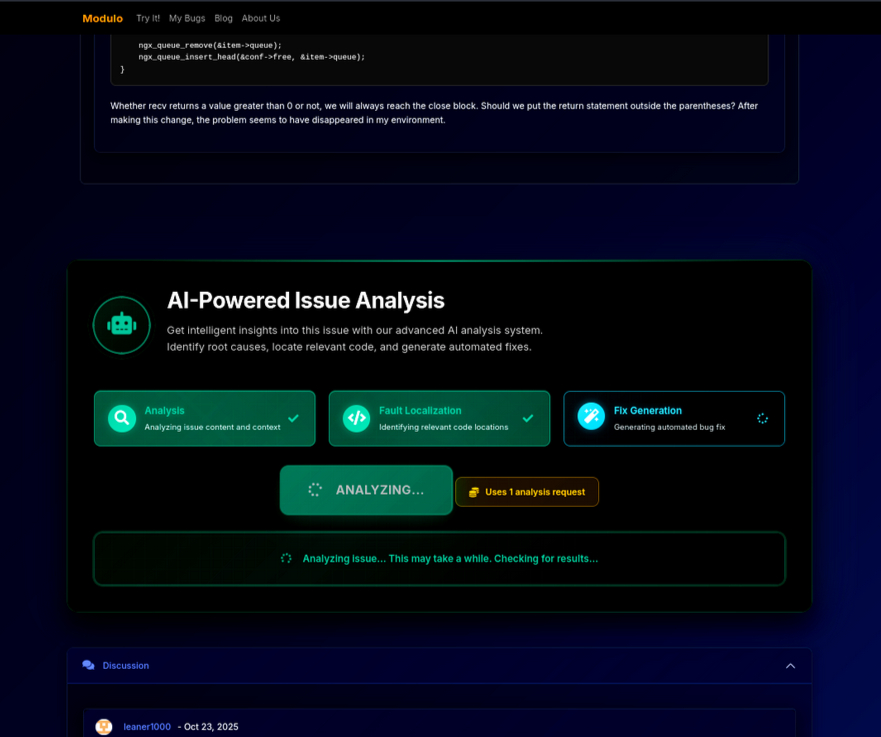
Modulo web application showing AI-powered issue analysis interface
Visit the Web App
Go to moduloware.ai and click "Try It!"
Authenticate with GitHub
Sign in with your GitHub account using OAuth (secure, read-only access). No installation required.
Select a Repository
Choose from your repositories or enter any public repository URL containing the GitHub issue you want to analyze.
Choose an Issue
Browse open issues in the repository. Issues with clear descriptions and error details work best.
Click "Analyze with AI"
Modulo AI will automatically:
- Analyze the issue description, comments, and error messages
- Identify relevant code files and functions
- Perform intelligent fault localization with confidence scoring
- Generate a working code fix with explanations
Using Modulo
Modulo provides two powerful interfaces for automated bug fixing: GitHub Bot interactions for seamless issue resolution within your workflow, and a web application for browser-based analysis.
GitHub Bot Interactions
Once Modulo is installed on your repository, you can activate it by commenting on any GitHub issue with specific keywords.
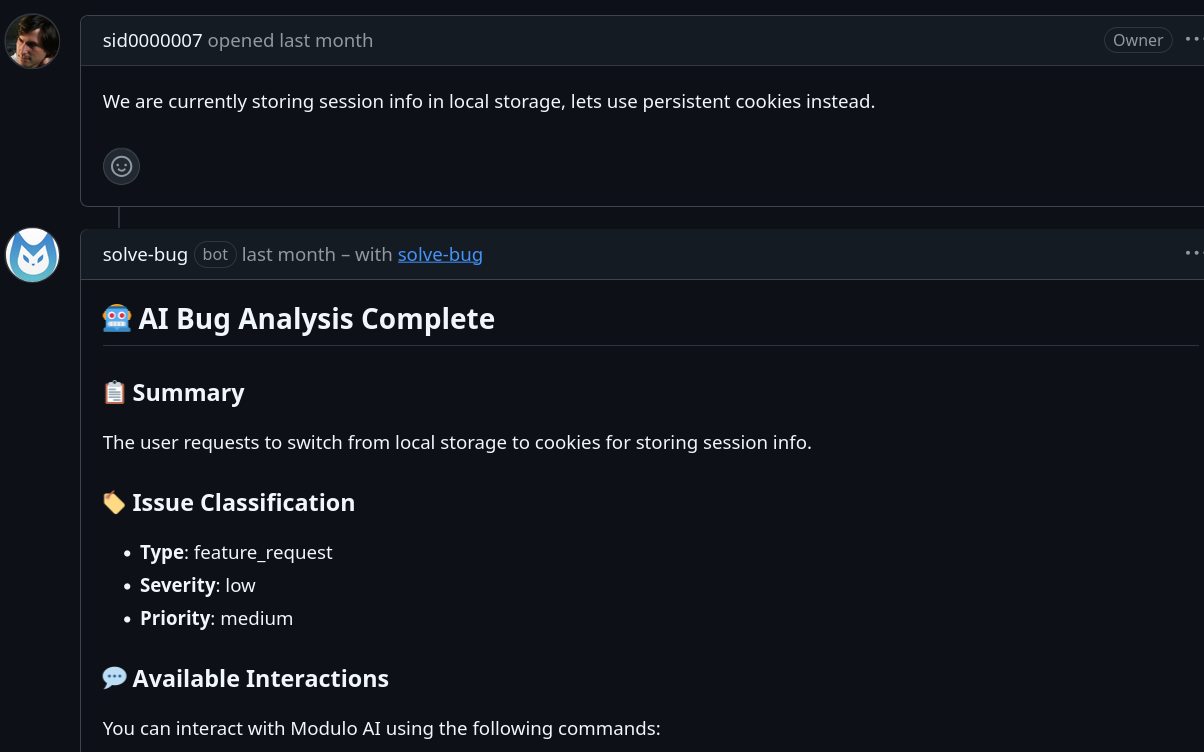
AI-generated bug analysis summary with intelligent insights
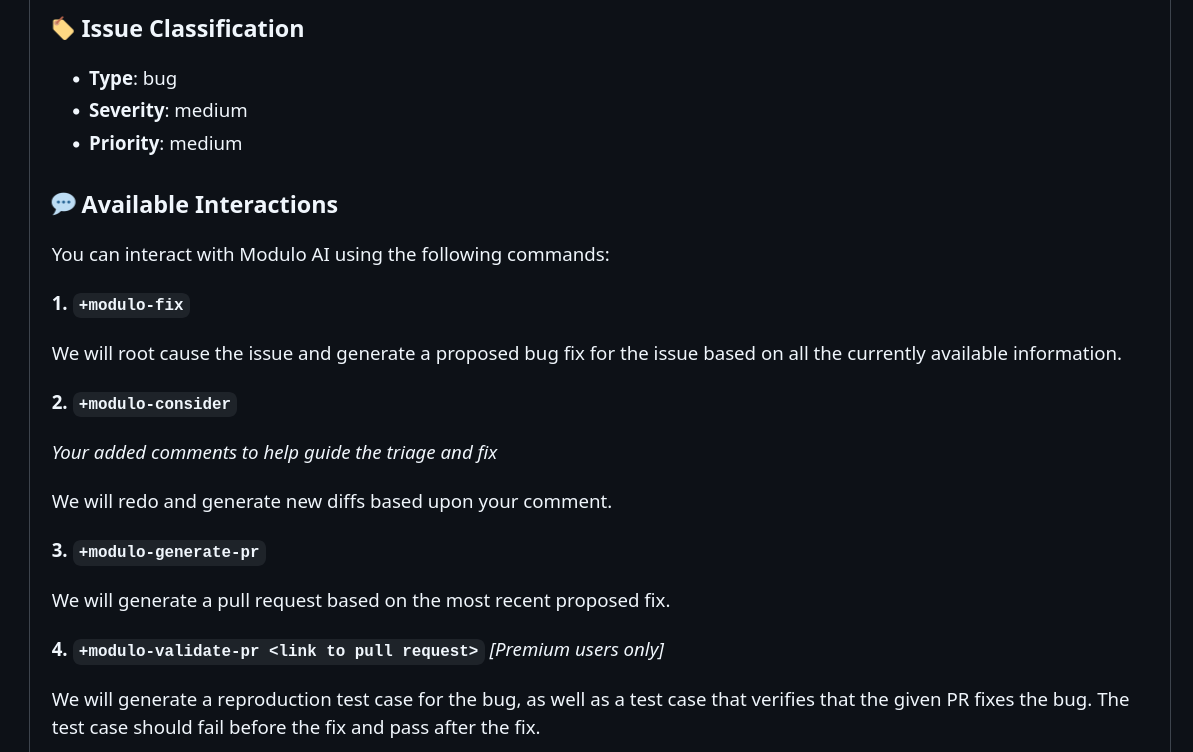
Automatic issue classification with type, severity, and priority assessment
solve-bug
Primary
Generate automated bug fix - Modulo will root cause the issue and generate a proposed bug fix based on all currently available information.
solve-bug
What happens: Modulo analyzes the issue, identifies relevant files, performs fault localization, and generates code diffs with explanations.
solve-bug-again
Iterative
Regenerate fix with user guidance - Add your comments or additional context, and Modulo will redo the analysis and generate new diffs based on your feedback.
The fix should focus on the authentication module, not the database layer.

solve-bug-again
Best for: Refining the approach when the first fix doesn't address the root cause or when you want to guide the AI with specific constraints.
solve-bug-pr
Automation
Create pull request from the latest suggested fix - Modulo will generate a PR with the most recent proposed fix, complete with detailed descriptions.
solve-bug-pr
What you get: A ready-to-review pull request with code changes, explanations, and links back to the original issue.
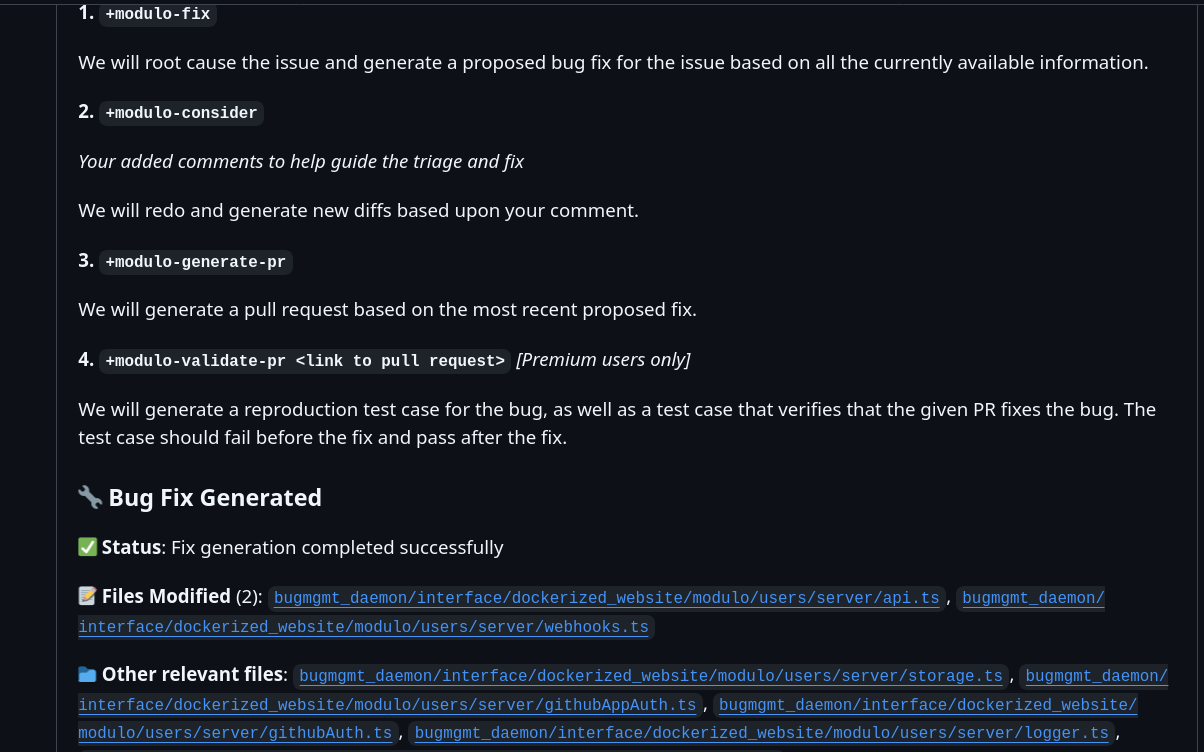
Interactive commands available for GitHub issue resolution
Typical GitHub Bot Workflow
Team member or user reports a bug in GitHub Issues
Comment solve-bug on the issue
Modulo analyzes and generates fix (5-10 min)
Comment solve-bug-pr to generate pull request
Team reviews and merges the automated fix
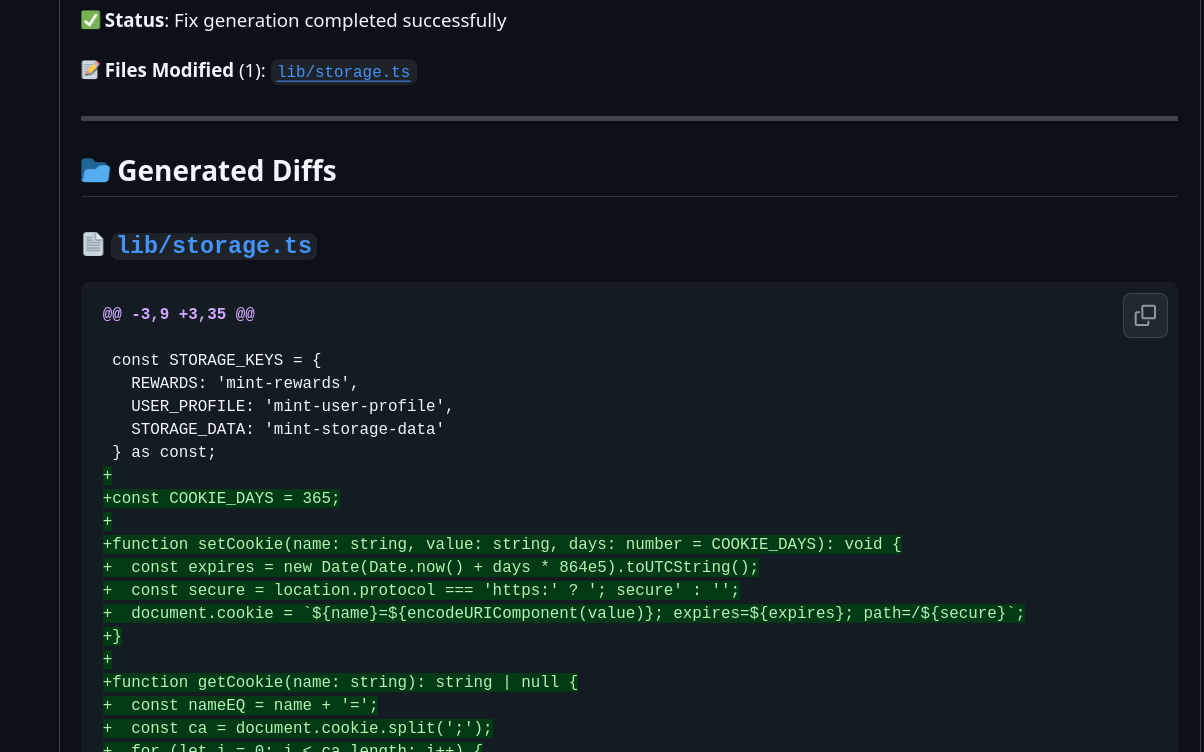
AI-generated code fix with file modifications and status indicators
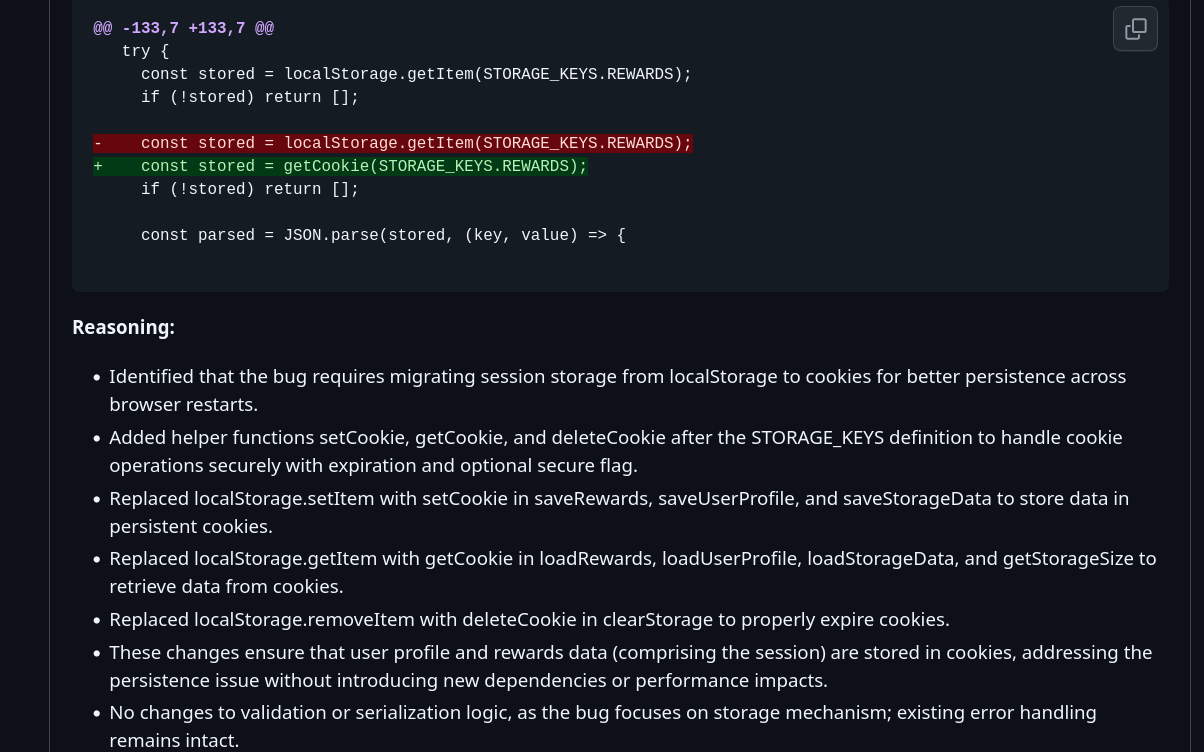
Detailed reasoning and explanation for each generated code diff
Web App Workflow
The Modulo web application provides a visual interface for analyzing GitHub issues and reviewing AI-generated fixes.
Issue Selection
Browse and filter issues from any public or accessible repository. The interface shows issue titles, labels, and status at a glance.
Confidence Scoring
Each identified file and proposed fix comes with a confidence score (typically 85-95% for common issues), helping you assess the quality of the analysis.
Code Preview
Review generated fixes with syntax highlighting, side-by-side diffs, and inline explanations of what changed and why.
File Context
See which files were identified as relevant, with links to view them in GitHub and understanding of how they relate to the bug.
Architecture
Modulo uses a sophisticated multi-agent architecture designed for high performance and accuracy. Our system breaks down complex bug-fixing tasks into specialized stages, each handled by dedicated AI agents.
How Modulo Works
Modulo's architecture is built on three core principles: parallelism, specialization, and asynchronous communication.
High-Performance Design
Traditional LLM applications process tasks sequentially, leading to slow response times. Modulo achieves up to 16x throughput improvement through intelligent parallelization:
- Chunked Processing: Large codebases are decomposed into manageable chunks, each analyzed in parallel
- Concurrent LLM Calls: Multiple LLM requests run simultaneously across separate threads
- Reduced Latency: Analysis that would take 10+ minutes completes in under 60 seconds
Example: Analyzing 50 files sequentially at 50 tokens/sec = 600 seconds. With 16 parallel threads at 50 tokens/sec each = 800 tokens/sec total = 37.5 seconds.
Microservices Pipeline
Modulo's bug-fixing pipeline consists of independent stages that can operate concurrently:
Parse & Compress
Extract relevant information from bug reports and artifacts
Reproduce Bug
Generate test case to reproduce the issue
Root Cause
Identify the specific code causing the bug
Generate Fix
Create code changes to resolve the issue
Validate
Verify fix against reproduction test
Context Management
Processing large codebases efficiently requires intelligent context management:
- Vector Database: Memory embeddings for fast semantic search
- Graph Database: Code structure and dependency relationships
- Token Optimization: Only relevant context is included in LLM prompts, reducing costs and improving throughput (60 tok/s → 216 tok/s improvement)
Multi-Agent System
Modulo employs specialized AI agents that communicate asynchronously via message queues. Each agent is optimized for a specific task in the bug-fixing workflow.
Analysis Agent
Purpose: Comprehension and classification of GitHub issues
Capabilities:
- Parse issue descriptions, comments, and error messages
- Classify bug type (runtime error, API problem, logic bug, etc.)
- Assess severity and priority
- Extract structured information for downstream agents
Fault Localization Agent
Purpose: Identify relevant code files with confidence scoring
Capabilities:
- Analyze codebase structure and dependencies
- Score files by relevance to the reported bug (0-100%)
- Provide reasoning for each identified file
- Narrow search space for fix generation
Uses "needle in a haystack" approach: parallel analysis of file chunks with aggregation
Planner Agent
Purpose: Determine fix strategy and approach
Capabilities:
- Decide whether to modify existing code or create new files
- Plan order of operations for complex fixes
- Assess potential side effects and breaking changes
- Generate high-level fix outline
Repository Knowledge Graph
Purpose: Understand code structure and relationships
Capabilities:
- Build graph of functions, classes, and dependencies
- Track import relationships and call hierarchies
- Identify code that might be affected by changes
- Provide context for fix generation
Uses CTags and static analysis for accurate code understanding
Fix Generation Agent
Purpose: Create code diffs and explanations
Capabilities:
- Generate syntactically correct code changes
- Maintain existing code style and conventions
- Follow language-specific best practices
- Provide reasoning for each change
Asynchronous Communication via RabbitMQ
Agents don't communicate directly. Instead, they publish messages to queues and consume from others:
Incoming bug fix requests
Multiple workers pull requests concurrently
Results published back to caller
Benefits:
- Fault Isolation: Agent failures don't crash the entire system
- Independent Scaling: Add more workers for bottleneck stages
- Retry Logic: Failed operations automatically retry with exponential backoff
- Observability: Each message is logged and tracked through the pipeline
Configuration & Account Management
Manage your Modulo account, configure API access, monitor usage, and control privacy settings through the user dashboard at users.moduloware.ai.
User Dashboard
Your dashboard provides a comprehensive overview of your Modulo usage, subscription status, and account statistics.
Quota Monitoring
Track your monthly bug fix quota usage in real-time:
- Visual progress bar showing percentage used
- Remaining quota clearly displayed
- Automatic alerts at 80% and 100% thresholds
- Next reset date displayed
Usage Statistics
Monitor your activity with detailed metrics:
- Bugs Analyzed: Total number of issues you've analyzed (all time)
- PRs Merged: Pull requests created by Modulo that have been merged
- API Calls: Number of API requests made this month
Subscription Tier Badge
Your current plan is prominently displayed:
- Free: 25 bugs/month
- Pro: 50 bugs/month
- Super User: 100 bugs/month
GitHub Marketplace Integration
If you subscribed via GitHub Marketplace, your dashboard shows:
- Current plan name and billing cycle
- Subscription status (active, canceled, etc.)
- Next billing date
- Pending plan changes
- Link to manage subscription on GitHub
API Keys
API keys are displayed only once at creation. If you lose your key, you'll need to revoke it and create a new one. Store keys securely using a password manager or environment variables.
API keys allow you to authenticate with Modulo from other platforms, including IDE extensions and programmatic access.
Creating an API Key
Navigate to the API Keys section in your dashboard
Click "Create New API Key" and provide a descriptive name (e.g., "VSCode Extension", "CI/CD Pipeline")
Copy the key immediately - it will never be shown again
Store securely in your password manager or environment variables
Per-Key Usage Tracking
Each API key tracks its own usage statistics:
- Number of API calls made with this specific key
- Last used timestamp
- Key status (active/revoked)
Revoking API Keys
If a key is compromised or no longer needed:
- Go to the API Keys section
- Find the key you want to revoke
- Click "Revoke"
- Confirm the action - this is immediate and cannot be undone
Billing & Subscriptions
Modulo offers flexible subscription tiers with transparent pricing. Manage your plan, payment methods, and billing history through the dashboard.
Subscription Tiers
Free
- 25 bug fixes per month
- User-owned repositories only
- 1 interaction per bug
- Email support (48hr response)
- Web app access
Pro
- 50 bug fixes per month
- Any public repository
- Unlimited interactions
- Email support (24hr response)
- API access
- Priority processing
Super User
- 100 bug fixes per month
- Any public repository
- Unlimited interactions
- Priority support (12hr response)
- Advanced analytics
- API access
- Highest priority processing
Payment Providers
Modulo supports two payment processors for your convenience:
- Stripe: For users in the US, Europe, and most international locations (charges in USD)
- Razorpay: For users in India (charges in INR, 1 USD = 83 INR)
The appropriate payment provider is automatically selected based on your location.
Upgrading or Downgrading
- Navigate to Billing & Subscription in your dashboard
- View your current plan details
- Click "Upgrade" or "Change Plan"
- Select your desired tier and billing cycle (monthly/annual)
- Complete payment through Stripe or Razorpay
Changes take effect immediately. Downgrades occur at the end of your current billing period.
Billing Portal
Access your billing portal to:
- View and download invoices
- Update payment methods
- View payment history
- Cancel subscription
Privacy & GDPR Compliance
Modulo is committed to protecting your privacy and maintaining compliance with global data protection regulations including GDPR, CCPA, and SOC 2 standards.
Data Export
Request a comprehensive export of all your personal data:
- Account information and profile data
- API keys and usage logs
- Subscription and billing history
- Bug analysis history and PR data
Exports are delivered via email within 24 hours in machine-readable JSON format.
To request: Go to Settings → Privacy & Data Controls → Export Your Data
Account Deletion
Permanently delete your account and all associated data:
- All personal data is permanently deleted
- All API keys are immediately revoked
- Subscription is canceled (no refunds)
- Bug analysis history is removed
Warning: This action cannot be undone. Make sure to export your data first if you need a backup.
To delete: Go to Settings → Privacy & Data Controls → Delete Account
Data Protection
How we protect your data:
- Encryption at Rest: All data encrypted using AES-256
- Encryption in Transit: TLS 1.2+ for all connections
- No Third-Party Sharing: Your data is never shared without explicit consent
- Minimal Data Collection: We only collect what's necessary for service operation
Compliance Standards
Modulo complies with:
- GDPR: EU General Data Protection Regulation
- CCPA: California Consumer Privacy Act
- SOC 2: Service Organization Control security standards
- DPDP Act 2023: India's Digital Personal Data Protection Act
View our full Privacy Policy and Terms of Service for complete details.
Pricing
Modulo offers transparent, predictable pricing with no hidden fees. All plans include access to the web app and GitHub bot.
For detailed pricing information and to compare plans, see the Billing & Subscriptions section above.
Terms of Service
By using Modulo, you agree to our Terms of Service which govern your use of the platform, data handling, and service availability.
Read Our Terms of Service
Review the complete terms governing your use of Modulo AI services.
View Terms of ServiceSupport
Need help? We're here to support you with multiple channels based on your subscription tier.
Email Support
Contact our team at contact@moduloware.ai
- Free: 48-hour response time
- Pro: 24-hour response time
- Super User: 12-hour priority response
Frequently Asked Questions
What programming languages does Modulo support?
Modulo supports all major programming languages including JavaScript/TypeScript, Python, Java, C/C++, Go, Ruby, PHP, Rust, Kotlin, Swift, and more.
How long does it take to analyze an issue?
Most issues are analyzed in 5-10 minutes, which is 10x faster than manual debugging (typically 2-4 hours).
Can I use Modulo on private repositories?
Yes! All subscription tiers work with user-owned private repositories. Public repository access varies by tier.
What happens if I reach my monthly quota?
You'll receive notifications at 80% and 100% usage. To continue using Modulo, you can upgrade your plan or wait until your quota resets at the start of the next billing cycle.